
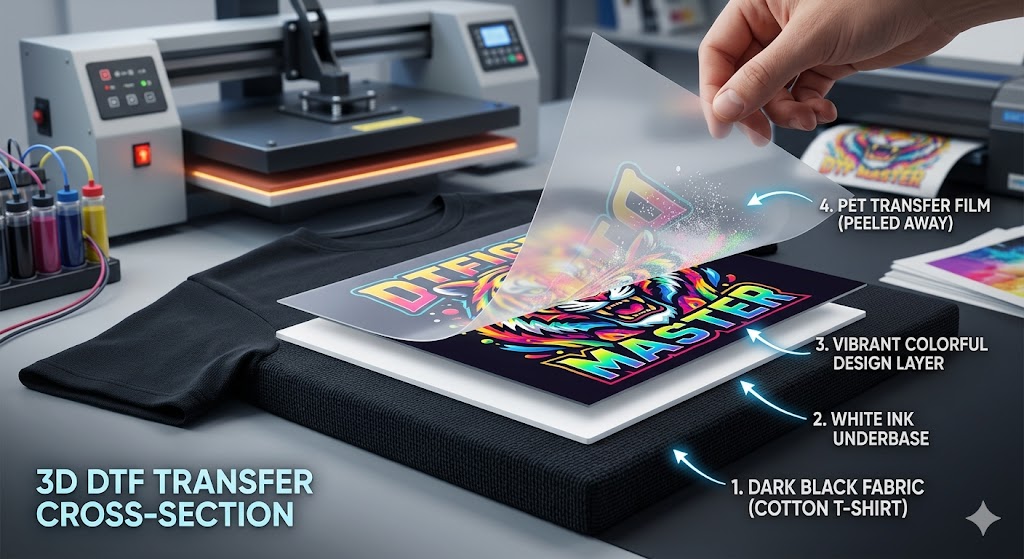
One of the most common questions we get is: "Will my design look good on a black shirt?" The answer is yes — and the reason is the white underbase that every DTF transfer includes automatically. This guide explains exactly how white underbase works, why it matters, and how to get the best results on dark fabrics.
What Is White Underbase in DTF Printing?
When a DTF transfer is printed, the printer lays down a layer of white ink first, directly beneath your design colors. This white layer acts as a foundation — it prevents the dark fabric from bleeding through and dulling your colors, the same way a painter primes a wall white before applying color.
Without a white underbase, printing cyan, magenta, yellow, or any color directly onto black fabric would result in a nearly invisible print because the dark fabric absorbs and cancels out the ink. The white underbase creates a bright, opaque base that makes every color above it appear vivid and accurate.
Is White Underbase Included Automatically?
Yes — every DTF transfer we print includes white underbase automatically. You do not need to request it or prepare your file differently for dark garments. Our RIP software handles white underbase generation based on the transparent areas of your PNG file.
This is one of the key advantages of DTF over other transfer methods like laser or sublimation — DTF works on dark fabrics out of the box, with no extra steps or fees.
How DTF Compares to Other Methods on Dark Fabric
| Method | Works on Dark Fabric? | How? |
|---|---|---|
| DTF Transfer | Yes — always | Automatic white underbase on every print |
| Screen Print | Yes — extra cost | Requires a separate white underbase screen (+$) |
| Sublimation | No | Only works on white or very light polyester |
| HTV Vinyl | Yes | Vinyl is opaque by nature, but no gradients or photos |
| Laser Transfer | Limited | Special dark-fabric papers needed, lower quality |
Will the White Underbase Show Around My Design?
When your PNG file has a clean transparent background and the design edges are sharp, the white underbase prints only directly behind your artwork — it will not show a white box around the design. The key is submitting a proper PNG:
- Transparent background (not white) — this tells the printer exactly where to place white ink
- Clean, anti-aliased edges — avoid rough or jagged edges that can cause a visible white fringe
- No stray pixels — zoom in and check your artwork for isolated pixels outside the main design
If you submit a JPG or a PNG with a white background, white ink will print behind the entire rectangle of your image — which will look like a white box on dark fabric. Always use PNG with transparency.
Tips for Best Results on Dark Fabrics
- Use bold, high-contrast colors — they look most vibrant on dark shirts
- Avoid very light grays or pale pastels — they can look washed out on black even with underbase
- White elements in your design will appear bright white — this is a strength of DTF on dark fabric
- Press at full temperature — 305°F for 15 seconds on dark cotton for maximum adhesion
- Pre-press the garment — removing moisture helps the underbase bond properly to dark fabric
Does White Underbase Affect the Feel of the Transfer?
Yes — DTF transfers have a slight raised feel due to the ink and adhesive layers. On dark garments with a full white underbase, the feel is slightly more pronounced than on light garments. The print will be smooth and flexible, but you will be able to feel it with your fingertip. This is normal and expected for DTF on dark fabric.
After 10–15 washes, the transfer softens slightly and the hand feel becomes less noticeable.
Ready to Print on Dark Shirts?
Upload your PNG with a transparent background and we handle the rest — white underbase included automatically, no extra charge. Order from Raleigh Transfers with same-day printing from Fuquay Varina, NC, shipping to Raleigh, Cary, Durham, and anywhere in the USA.